

Epson Smart Panel
Epson Smart Panel App Info
-
App Name
Epson Smart Panel
-
Package Name
com.epson.epsonsmart
-
Developer
Seiko Epson Corporation -
Category
Tools -
Updated
2026/02/18
-
Version
5.2.2
Epson Smart Panel App Usage Overview
💼 For busy offices and subscription-based workflows, Epson Smart Panel acts like a mobile command center for your compatible Epson wireless printer or scanner.
🚀 Download the app and pair it with a supported device to set up, monitor, and operate your Epson product from your phone or tablet.
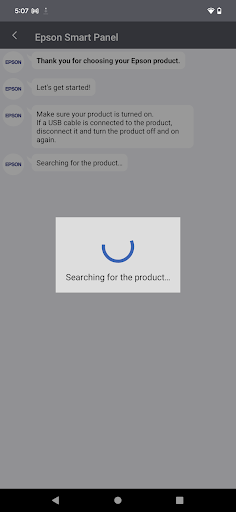
📡 The app makes Wi‑Fi onboarding simple, helping you connect quickly so users can start printing or scanning without extended IT involvement.
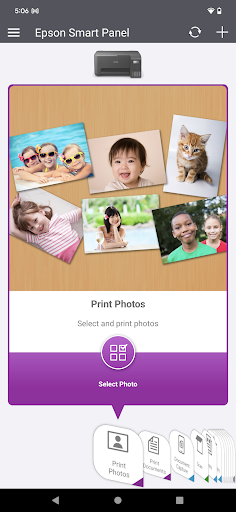
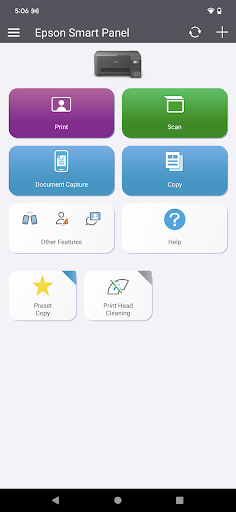
⚙️ It uses action tiles to surface common tasks, so you spend less time hunting for buttons and more time completing work.
🧩 Auto configuration and customization “tailor the experience” to your specific Epson hardware, reducing friction across departments and shared devices.
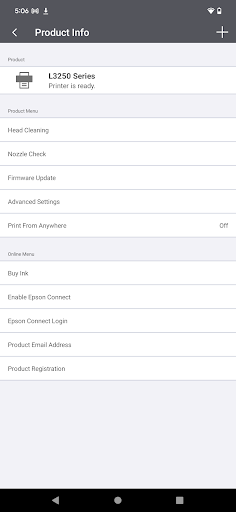
🛡️ From one place, you can register the product, check supplies, and access help, which helps support teams deliver faster responses and fewer repeat tickets.
🧾 One interface can serve both Epson printers and scanners, streamlining management for businesses running mixed device fleets.
📌 Important: the app may not find or connect to your product unless it appears on Epson’s supported product list, so always confirm compatibility first.
⏱️ Epson Smart Panel requires data usage and a compatible smart device, so plan for any connectivity or cost considerations in corporate environments.
🔁 If your printer or scanner is not listed, Epson points users to Epson iPrint for printers and Document Scan for scanners instead.
Pros of Epson Smart Panel App
✅ Quick, guided setup helps reduce onboarding time for Wi‑Fi-connected printers and scanners in offices and small workgroups.
📲 Action tiles improve day-to-day usability, making it easier for staff to execute tasks quickly without learning a complicated interface.
🎛️ Auto configuration and personalization streamline the experience across multiple devices, which is especially helpful when teams manage shared equipment.
Cons of Epson Smart Panel App
⚠️ Compatibility is strict: if your exact printer or scanner model is not on the supported list, the app may not connect.
📶 Data usage fees may apply, which can matter for organizations relying on capped mobile plans or remote workers.
🧑💻 For unsupported hardware, you must switch to other Epson apps, which can fragment workflows across the organization.
Summary
🧠 Overall, Epson Smart Panel feels designed for practical business use: it aims to centralize setup, monitoring, and support in one mobile interface.
🏢 For teams that value predictable operations and faster support cycles, the register-supplies-help flow is a smart convenience.
📌 The auto configuration approach is a genuine quality-of-life improvement, because it reduces the “first-time setup” burden on users.
💡 Still, the biggest limitation is the supported-product requirement, so proactive model verification is essential for any deployment plan.
💼 If your organization already uses compatible Epson wireless devices, the app can support subscription-like device management habits.
🔐 For enterprises and SaaS-adjacent operators managing fleets, a dependable mobile command center can reduce operational friction and improve service readiness.
🧾 Personally, I found it most useful as a lightweight control layer for everyday tasks and support access, rather than a replacement for all scanning or printing needs.
How to Download the Epson Smart Panel App
⬇️ You can download Epson Smart Panel from our website, then install it on a compatible smart device to begin setup.
🔍 After installation, verify that your Epson wireless printer or scanner appears on Epson’s supported product list to ensure successful discovery and connection.
📲 Once connected, the app’s interface should auto-tailor to your device, enabling action tiles and streamlined monitoring from your phone.
🧰 If your product is not supported, remember Epson suggests using Epson iPrint for printers or Document Scan for scanners.
Epson Smart Panel
Version 5.2.2 Updated 2026/02/18


