

Walgreens


Walgreens App Info
-
App Name
Walgreens
-
Package Name
com.usablenet.mobile.walgreen
-
Developer
Walgreens Co -
Category
Shopping -
Updated
2026/04/14
-
Version
112.0
Walgreens App Usage Overview
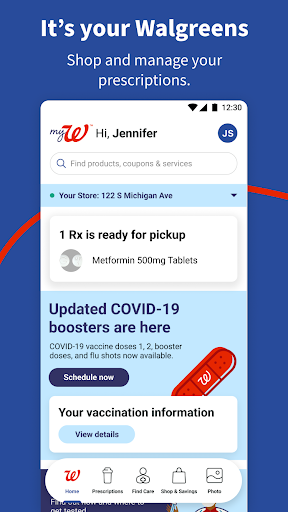
📱 The Walgreens app brings pharmacy, health services, and shopping into one place, so busy families can manage prescriptions, care, and essentials without juggling multiple accounts.
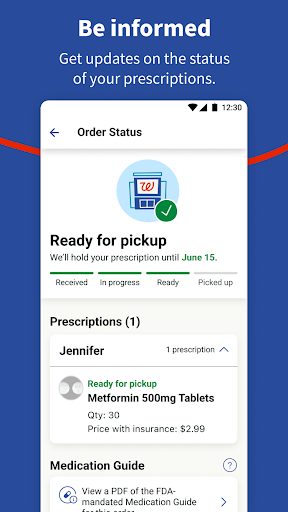
🔄 You can refill prescriptions by scanning your bottle, get refill updates, and track order status for everyone in your household from a single dashboard.
🩺 The app also supports 24/7 virtual visits for many non-emergency needs, plus guidance topics like diabetes, pain management, and mental health.
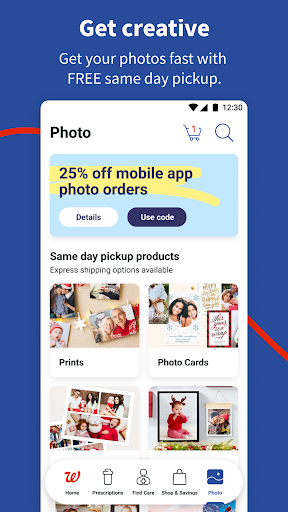
📷 If you love photo keepsakes, you can upload images to create prints and gifts available in as little as 1 hour at your local Walgreens.
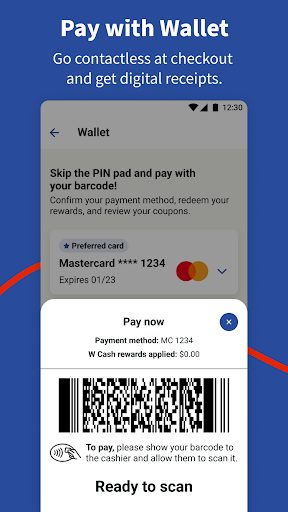
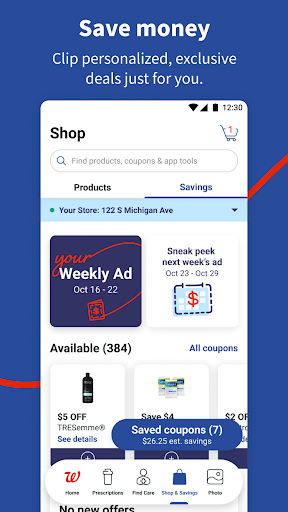
🛍️ For savings-minded shoppers, the app includes deal clipping, a Weekly Ad, personalized offers, and Walgreens Cash rewards tied to everyday purchases.
🔐 Walgreens integrates practical device permissions to power these workflows, from scanning to secure consultation sessions with healthcare providers.
💳 For monetization and targeting, advertisers and high-value partners benefit from the app’s strong intent signals around healthcare purchases, loyalty programs, and subscription-adjacent services like ongoing refill habits.
🧾 While the app is free to download, your wireless provider rates and any applicable terms may still apply, so it’s worth reviewing details in your account agreement.
Pros of Walgreens App
✅ 1) Refill automation and prescription convenience feel fast and modern, especially with scan-based refills, alerts, and order tracking built for the whole family.
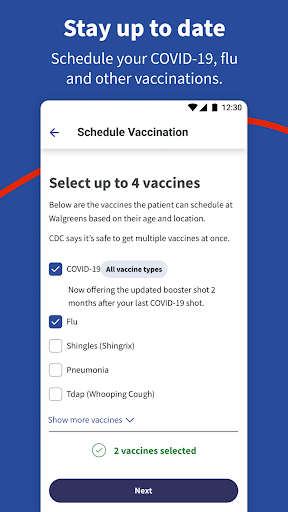
🏥 2) Health services go beyond basics, offering vaccination booking, COVID-19 and flu test scheduling, and eligibility checks for antiviral treatment.
👩⚕️ 3) Virtual care and expert guidance are available 24/7 through pharmacy chat and online visits, which can reduce friction for non-emergency concerns.
📬 Bonus advantage: The app’s notifications and alerts make it easier to avoid missed refills, supporting continuity for chronic-care routines.
💰 Another advantage: Walgreens Cash rewards and personalized offers can make the app feel financially rewarding, similar to loyalty-first shopping experiences.
Cons of Walgreens App
⚠️ 1) The feature set is broad, so first-time users may feel overwhelmed by the number of paths: pharmacy, health services, photo creation, and shopping tools.
🔔 2) Notifications for alerts and offers can become frequent, and some users may need to adjust settings to avoid message fatigue.
📶 3) Permissions-driven features like scanning and consultation access require multiple device settings, which can be privacy-sensitive for some shoppers.
🧩 Additional drawback: Same-day pickup and quick photo turnaround depend on store availability, so timing expectations may vary by location.
🛒 Another drawback: Deals and promo codes change regularly, meaning you may need to check often to get the best value, especially during competitive discount cycles.
Summary
🧠 Overall, the Walgreens app is a practical hub for pharmacy refills, everyday savings, and health access, designed for convenience and habit-building.
🌟 For families, the ability to track orders and manage refills in one place reduces coordination stress and supports ongoing care routines.
🩻 For health-focused users, the combination of pharmacy chat and virtual visits makes the app feel like a supportive health companion rather than just a shopping tool.
🖼️ For creative shoppers, photo uploads and same-day pickup turn ordinary errands into quick, personalized gift-making.
💡 If you value loyalty programs, coupon-style deal clipping, and predictable savings rhythms, this app’s rewards mechanics can feel aligned with high-intent consumer behavior.
📌 In a market where many apps separate health and commerce, Walgreens stands out by linking prescriptions, guidance, and store savings under one login experience.
How to Download the Walgreens App
⬇️ You can download the Walgreens app from our website, then sign in to start refills, book services, and access photo and shopping features.
🧾 After installation, review the permissions prompts so scanning, photo uploads, and consultation experiences work smoothly.
📍 When prompted, enable location services if you want nearby store discovery and in-store savings support.
📸 Allow storage access so you can pick photos already saved on your device for prints, posters, calendars, and cards.
📷 Grant camera and flashlight permissions to support scanning for refill workflows and other in-app recognition features.
🔔 Enable vibration feedback and power settings when needed so the app can confirm scans and keep screens active during live consultations.
🎙️ Finally, use microphone access if you plan to speak with a pharmacy provider or search for products and coupons by voice.
- Location: Find nearby stores and enable in-store savings
- Storage: Access photos stored on your device that you want to print or share
- Camera: Take photos and use features that require scanning
- Flashlight: Enhance the lighting in scanning features
- Control vibration: Indicate that a scan is complete
- Microphone: Speak to a healthcare provider over the phone or video, or to search for products and coupons using your voice
- Prevent phone from sleeping: Keep screen from dimming during a live consultation with a healthcare provider
- Change audio settings: Control the volume during a live consultation with a healthcare provider
🌐 The Walgreens app is free to download, but wireless carrier rates and additional fees may still apply according to your Walgreens account agreement(s).
🔎 For complete details and restrictions, check Walgreens.com.
Walgreens
Version 112.0 Updated 2026/04/14


