

Microsoft OneDrive




Microsoft OneDrive App Info
-
App Name
Microsoft OneDrive
-
Package Name
com.microsoft.skydrive
-
Developer
Microsoft Corporation -
Category
Productivity -
Updated
2026/04/21
-
Version
7.53.1
1. Microsoft OneDrive App Usage Overview
🚀 Microsoft OneDrive is built for cloud storage, sync, and secure access across phones, tablets, and PCs, with 5 GB of free space to start.
🔐 You can also upgrade to Microsoft 365 Personal or Family for 1 TB per user, designed for heavy file storage, premium collaboration, and backup.
🌍 With OneDrive, you can access files anywhere, including offline access to selected items when you need them most.
📸 The app makes photo and video backup effortless using Camera Upload for automatic saving and easy cross-device viewing.
🏷️ For organization, it offers a secure photo locker with automatic tagging, helping you locate moments faster without manual sorting.
🔒 Encrypted storage helps keep media safe, and the locker is designed to protect sensitive personal content.
🗂️ For file sharing and productivity, you can share files, photos, videos, and albums with friends, family, or coworkers using secure settings.
🔕 You can manage collaboration by getting notifications when shared documents are edited, which supports smoother team coordination.
🧩 OneDrive supports secure folder settings with password-protected or expiring sharing links, useful for business workflows and privacy needs.
💼 For business users and enterprise scenarios, you can access selected OneDrive files on the app without being online, improving reliability.
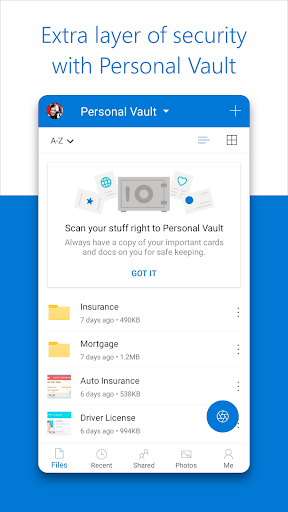
🛡️ Security features include encryption at rest and in transit, plus Personal Vault for identity-verified protection.
⏳ Version history helps restore previous file versions, which is valuable for document control in professional environments.
🧯 Ransomware detection and recovery features can help reduce the impact of malicious events, aligning with security-focused SaaS and IT priorities.
🤝 Microsoft collaboration is also a strength, since you can share across platforms and edit Word, Excel, PowerPoint, and OneNote files stored in OneDrive.
📊 Real-time collaboration works best when teams rely on Microsoft ecosystems for enterprise-grade document workflows.
📝 The app includes document scanning features to scan, sign, mark up, and send documents directly, supporting productivity and compliance needs.
🔎 Search makes finding content easier, including searching photos by what’s in them and searching documents by name or content.
🧠 Copilot support can summarize documents, extract key details, suggest folder structures, and recommend sharing and collaboration approaches.
📌 Note that Copilot’s full experience depends on a qualifying Microsoft 365 subscription for your phone, tablet, PC, and Mac.
💰 If you’re comparing storage subscriptions, OneDrive’s 1 TB per person pricing and premium sharing benefits are tailored for long-term use.
📱 Subscriptions are purchased in-app and billed to your Google Play account, automatically renewing unless disabled in settings.
📄 For work or school use, you may need a qualifying OneDrive, SharePoint Online, or Microsoft 365 Business subscription.
🔐 Privacy policy links are available, including consumer health privacy details, supporting transparency for regulated audiences.
2. Pros of Microsoft OneDrive App
✅ OneDrive starts with 5 GB free storage, which is a practical entry point for personal backup and light business file syncing.
📈 The upgrade path to Microsoft 365 Personal or Family brings 1 TB per user, helping high-volume users justify SaaS-style subscription value.
🌐 You get flexible access anywhere, plus offline access for selected files, which supports remote work and travel routines.
📸 Camera Upload automates photo and video backup, reducing the friction that often causes people to lose media.
🏷️ Secure photo locker with automatic tagging improves organization, especially when users manage large libraries and share them often.
🔒 Encrypted storage for photos and videos adds reassurance for sensitive personal content and professional media.
🗂️ Sharing is designed for control, with notifications for edits and secure folder settings that support password-protected or expiring links.
📣 Access selected files offline helps continuity when network reliability is inconsistent, a common issue for enterprise and field users.
🛡️ Security at a fundamental level includes encryption in transit and at rest, which aligns well with compliance-minded finance teams.
🧬 Personal Vault adds identity-verified protection, helping protect high-value documents that you might store as part of an accounting workflow.
🕒 Version history is a smart operational feature, letting users recover earlier document states after accidental changes.
🧯 Ransomware detection and recovery supports risk management priorities, which matters to organizations paying high-value IT security costs.
🤝 Collaboration through Microsoft Office apps improves productivity for shared files, supporting real-time editing across devices.
📄 Document scanning, markup, and signing help streamline processes that often involve approvals, contracts, or customer onboarding.
🔎 Intelligent search for photos and docs saves time, especially when you manage receipts, reports, or project archives.
🧠 Copilot assistance supports faster document workflows by summarizing content and extracting key details for decision-makers.
📊 For users evaluating subscription benefits, premium sharing links and increased daily sharing capacity can be valuable.
3. Cons of Microsoft OneDrive App
⚠️ While 5 GB free storage is helpful, heavy users often need Microsoft 365 for 1 TB per user, especially for large photo libraries.
💸 Subscription pricing varies by region, and Microsoft 365 Personal or Family can add ongoing costs that some users may resist.
📶 Offline access depends on selecting specific files, so casual users might expect offline availability more broadly.
🔗 Secure sharing features like expiring links require careful configuration, which can feel complex for non-technical users.
🧩 Copilot features require a qualifying Microsoft 365 subscription, so not everyone will experience the full AI workflow.
🗄️ For advanced security options such as Personal Vault, additional identity verification steps may be inconvenient during fast sharing.
📱 In-app subscription billing ties renewals to Google Play accounts, which may confuse users comparing finance or subscription management.
⏳ Subscriptions can’t be canceled or refunded during the active period, which reduces flexibility for short-term experimentation.
🏢 Work or school access may require specific sign-in conditions, which can create onboarding friction for certain organizations.
🧪 Document scanning and editing workflows depend on app capabilities and device performance, so results can vary by hardware.
🗂️ The app’s organization features are strong, but new users may need time to learn best folder structures and tagging logic.
4. Summary
⭐ Microsoft OneDrive is a polished cloud storage and collaboration app that balances convenience with security, starting with 5 GB free storage.
💼 For anyone considering high-value cloud subscriptions, the 1 TB per user Microsoft 365 upgrade is positioned for everyday productivity and business sharing.
📸 Photo backup, secure media handling, and smarter organization make it especially compelling for people who take many pictures or manage client content.
🔐 The encryption, Personal Vault protections, version history, and ransomware detection address common concerns for sensitive files.
🧠 With Copilot-style assistance, users can accelerate document review and planning, which is relevant for professionals dealing with frequent reports.
🧾 If you regularly scan, annotate, sign, and share documents, OneDrive reduces tool switching and supports faster workflows.
🧭 Overall, the app feels designed for both personal backup and serious collaboration, making it a strong option for finance, SaaS-adjacent, and enterprise-style users.
5. How to Download the Microsoft OneDrive App
⬇️ You can download the Microsoft OneDrive app from our website, where you’ll find the setup entry tailored to your device.
📱 After installing, sign in to get 5 GB free storage and begin syncing photos, documents, and shared albums.
🔁 If you upgrade to Microsoft 365 Personal or Family, you’ll unlock 1 TB per user, premium sharing, and additional collaboration features.
🧩 Once signed in, enable Camera Upload to automate photo and video backup and keep your library protected.
📦 Then configure sharing preferences, including password-protected or expiring links, to match your personal or work security needs.
🛡️ Finally, review Personal Vault options and confirm offline access settings so selected files are ready even without a connection.
Microsoft OneDrive
Version 7.53.1 Updated 2026/04/21


